

What is Microsoft Forms?
Easily create surveys to collect customer feedback, measure employee satisfaction, and organize team events. Microsoft Forms is simple to use, works on any web browser, and comes with themes and question branching so you won't have to do a lot of work to get to a great survey. Quickly create quizzes to measure student knowledge, evaluate class progress, and focus on topics that need improvement. Microsoft Forms lets you assign points for automatic grading and give explanations for further instruction, so quizzing students is easier than ever. Find out what the class thinks of your trip idea, where the team wants to meet, or how presentation attendees feel.
Company Details
Need Assistance?
We're here to help you with understanding our reports and the data inside to help you make decisions.
Get AssistanceMicrosoft Forms Ratings
Real user data aggregated to summarize the product performance and customer experience.
Download the entire Product Scorecard
to access more information on Microsoft Forms.
Product scores listed below represent current data. This may be different from data contained in reports and awards, which express data as of their publication date.
88 Likeliness to Recommend
97 Plan to Renew
86 Satisfaction of Cost Relative to Value
Emotional Footprint Overview
Product scores listed below represent current data. This may be different from data contained in reports and awards, which express data as of their publication date.
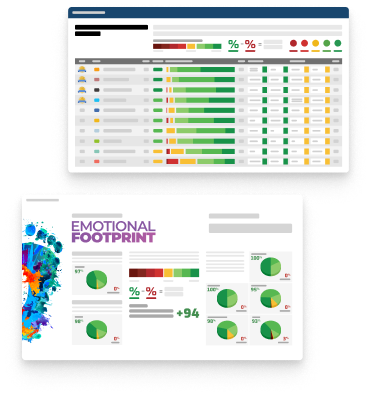
+94 Net Emotional Footprint
The emotional sentiment held by end users of the software based on their experience with the vendor. Responses are captured on an eight-point scale.
How much do users love Microsoft Forms?
Pros
- Trustworthy
- Reliable
- Enables Productivity
- Client Friendly Policies
How to read the Emotional Footprint
The Net Emotional Footprint measures high-level user sentiment towards particular product offerings. It aggregates emotional response ratings for various dimensions of the vendor-client relationship and product effectiveness, creating a powerful indicator of overall user feeling toward the vendor and product.
While purchasing decisions shouldn't be based on emotion, it's valuable to know what kind of emotional response the vendor you're considering elicits from their users.
Footprint
Negative
Neutral
Positive
Feature Ratings
Role and User Management
Branching and Logic
Customizable Branding
Questionnaire Design/Survey Builder
Mobile Support
Templates & Question Library
Collaboration
APIs and Integration
Multi-Channel Distribution
3rd-Party Integrations
Data Analysis and Visualization
Vendor Capability Ratings
Ease of Implementation
Business Value Created
Usability and Intuitiveness
Availability and Quality of Training
Ease of IT Administration
Ease of Customization
Product Strategy and Rate of Improvement
Ease of Data Integration
Quality of Features
Vendor Support
Breadth of Features
Also Featured in...
Microsoft Forms Reviews

Craig M.
- Role: Operations
- Industry: Communications
- Involvement: End User of Application
Submitted Sep 2024
Meets my needs for the most part, Can improve.
Likeliness to Recommend
What differentiates Microsoft Forms from other similar products?
Microsoft Forms boasts of a collection of advanced features which are just not available on a lot of substitute software programs out there. Some of these advanced features include password protection for Forms and the ability to set expiration dates for Forms we share with respondents.
What is your favorite aspect of this product?
I love Microsoft Forms integration with Excel. This integration has helped me export data from surveys or online forms into Excel easily, for better data analysis purposes. This is of importance since Excel is easily the best spreadsheet for data analysis at the moment.
What do you dislike most about this product?
Microsoft Forms is limited in its ability to allow multiple users collaborate on a form, at the same time. Collaboration supportive mechanisms such as the ability to add comments to survey forms is also non-existent. This makes the process of collecting real-time feedback from my teammates while creating Forms a bit tedious and cumbersome.
What recommendations would you give to someone considering this product?
Proven to be a reliable way to collect data from users via surveys and online forms.
Pros
- Reliable
- Performance Enhancing
- Enables Productivity
- Security Protects
Please tell us why you think this review should be flagged.
- Role: C-Level
- Industry: Retail
- Involvement: IT Leader or Manager
Submitted Sep 2024
Fantastic product and can replace your survey need
Likeliness to Recommend
Pros
- Helps Innovate
- Reliable
- Performance Enhancing
- Enables Productivity
Please tell us why you think this review should be flagged.

Sakshi K.
- Role: Sales Marketing
- Industry: Technology
- Involvement: End User of Application
Submitted Jul 2024
Fantastic Product
Likeliness to Recommend
What differentiates Microsoft Forms from other similar products?
Microsoft Forms stands out with its seamless integration into the Microsoft 365 suite, user-friendly interface, real-time collaboration, robust security, and comprehensive analytics, making data collection and analysis effortless.
What is your favorite aspect of this product?
My favorite aspect of Microsoft Forms is its intuitive interface, which makes creating and sharing surveys effortless while providing comprehensive data analysis and reporting features.
What do you dislike most about this product?
The most frustrating aspect of Microsoft Forms is its limited customization options, which restricts creating unique and visually appealing surveys. Enhanced design flexibility would greatly improve the user experience.
What recommendations would you give to someone considering this product?
I recommend Microsoft Forms for its user-friendly interface, versatile templates, and seamless integration with other Microsoft 365 apps, making it ideal for quick surveys and data collection.
Pros
- Friendly Negotiation
- Helps Innovate
- Continually Improving Product
- Trustworthy
Please tell us why you think this review should be flagged.



Get Instant Access<br>to this Report
Get Instant Access
to this Report
Unlock your first report with just a business email. Register to access our entire library.
© 2026 SoftwareReviews.com. All rights reserved.