
What is Microsoft Power BI?
Power BI is a business analytics solution that lets you visualize your data and share insights across your organization, or embed them in your app or website. Connect to hundreds of data sources and bring your data to life with live dashboards and reports.
Company Details
Need Assistance?
We're here to help you with understanding our reports and the data inside to help you make decisions.
Get AssistanceMicrosoft Power BI Ratings
Real user data aggregated to summarize the product performance and customer experience.
Download the entire Product Scorecard
to access more information on Microsoft Power BI.
Product scores listed below represent current data. This may be different from data contained in reports and awards, which express data as of their publication date.
88 Likeliness to Recommend
97 Plan to Renew
83 Satisfaction of Cost Relative to Value
1
Since last award
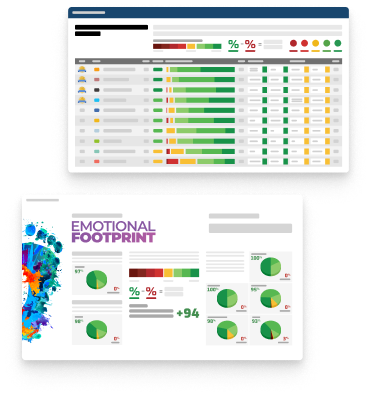
Emotional Footprint Overview
Product scores listed below represent current data. This may be different from data contained in reports and awards, which express data as of their publication date.
+90 Net Emotional Footprint
The emotional sentiment held by end users of the software based on their experience with the vendor. Responses are captured on an eight-point scale.
How much do users love Microsoft Power BI?
Pros
- Enables Productivity
- Helps Innovate
- Reliable
- Performance Enhancing
How to read the Emotional Footprint
The Net Emotional Footprint measures high-level user sentiment towards particular product offerings. It aggregates emotional response ratings for various dimensions of the vendor-client relationship and product effectiveness, creating a powerful indicator of overall user feeling toward the vendor and product.
While purchasing decisions shouldn't be based on emotion, it's valuable to know what kind of emotional response the vendor you're considering elicits from their users.
Footprint
Negative
Neutral
Positive
Feature Ratings
Dashboard
Data Exploration and Visualization
Collaboration
BI Security
BI Platform Administration
Operational Reporting Capabilities
Data Connectors and Data Mashup
Intelligent Alerts and Notifications
Self Service and Ad Hoc Capabilities
Mobile
Vendor Capability Ratings
Business Value Created
Breadth of Features
Ease of Implementation
Ease of Data Integration
Quality of Features
Usability and Intuitiveness
Availability and Quality of Training
Ease of IT Administration
Ease of Customization
Product Strategy and Rate of Improvement
Vendor Support
Also Featured in...
Microsoft Power BI Reviews

Abel A.
- Role: Information Technology
- Industry: Retail
- Involvement: IT Leader or Manager
Submitted Nov 2026
Overall, it’s a great product definitely help your
Likeliness to Recommend
What differentiates Microsoft Power BI from other similar products?
Ease of use and versatile it assist in our day-to-day operation with reporting and tracking spending
What is your favorite aspect of this product?
It’s an all-around product that I love and use on a daily basis
What do you dislike most about this product?
Cost is mainly the one thing that I do not like about the product. It tends to go up in price on a more frequent braces but other than that it’s OK.
What recommendations would you give to someone considering this product?
If you’re going to use this product, definitely test it out first get you someone that knows the product very well because it could be complicated at times
Pros
- Continually Improving Product
- Reliable
- Unique Features
- Effective Service
Cons
- Less Respectful
- Charges for Enhancements
Please tell us why you think this review should be flagged.

Shubham S.
- Role: Finance
- Industry: Finance
- Involvement: IT Development, Integration, and Administration
Submitted Oct 2026
Best tool for Data Visualization and dashboard
Likeliness to Recommend
What differentiates Microsoft Power BI from other similar products?
Power BI is the best because of it's seemless Microsoft Integration, user-friendly interface, low cost, dashboard creation, report generation and analytical abilities
What is your favorite aspect of this product?
Power BI is easy to use comparing with the other visualisation tolls. Dynamic charts and easy report creation. Useful insights can be produced in few minutes.
What do you dislike most about this product?
Nothing. It is perfect for my daily use and I am using it from last 2 years.
What recommendations would you give to someone considering this product?
If someone is looking or a best Data visualisation tool, it is the best tool to use. Highly recommended.
Pros
- Helps Innovate
- Continually Improving Product
- Performance Enhancing
- Trustworthy
Please tell us why you think this review should be flagged.

Bindu S.
- Role: Information Technology
- Industry: Technology
- Involvement: IT Development, Integration, and Administration
Submitted Sep 2026
best tool for analytics and visualization- powerBI
Likeliness to Recommend
What differentiates Microsoft Power BI from other similar products?
Microsoft Power BI differentiates itself from major competitors like Tableau and Looker through its native integration with the Microsoft 365 and Fabric ecosystem, a highly intuitive Excel-like interface, and a highly disruptive price-to-performance ratio.By allowing individual users to build local models for free on Power BI Desktop and offering enterprise cloud seats for around $14 per month, it dramatically undercuts legacy platforms that often cost up to five times as much. Furthermore, its built-in Power Query and DAX tools empower business analysts to perform complex data extraction, cleaning, and sophisticated modeling directly within
What is your favorite aspect of this product?
its front-end data transformation engine (Power Query and DAX).Unlike many enterprise BI tools that require clean, pre-packaged data from database engineers, Power BI gives everyday business analysts the power to connect directly to messy, raw data and reshape it themselves using an intuitive graphical interface. It bridges the gap between basic spreadsheets and complex data engineering, allowing non-technical users to build sophisticated data models without writing SQL or Python.
What do you dislike most about this product?
heavy platform limitations - Power BI Desktop remains strictly Windows-only and not compatible for Mac OS and they to install virtal machines to build the models
What recommendations would you give to someone considering this product?
audit your existing technology stack plan your data governance architecture before building reports.
Pros
- Helps Innovate
- Continually Improving Product
- Performance Enhancing
- Trustworthy
Please tell us why you think this review should be flagged.






Get Instant Access<br>to this Report
Get Instant Access
to this Report
Unlock your first report with just a business email. Register to access our entire library.
© 2026 SoftwareReviews.com. All rights reserved.