

What is Microsoft Teams?
Work together how you want, when you want. Create and collaborate on documents with others and keep everyone organized and up-to-date with shared notebooks.
Company Details
Need Assistance?
We're here to help you with understanding our reports and the data inside to help you make decisions.
Get AssistanceMicrosoft Teams Ratings
Real user data aggregated to summarize the product performance and customer experience.
Download the entire Product Scorecard
to access more information on Microsoft Teams.
Product scores listed below represent current data. This may be different from data contained in reports and awards, which express data as of their publication date.
91 Likeliness to Recommend
99 Plan to Renew
1
Since last award
85 Satisfaction of Cost Relative to Value
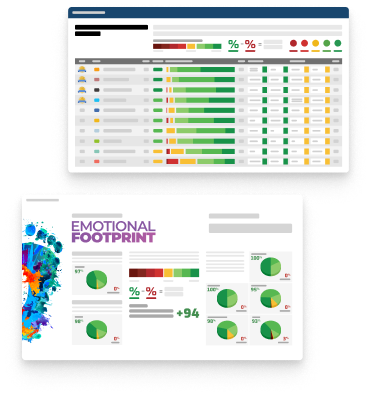
Emotional Footprint Overview
Product scores listed below represent current data. This may be different from data contained in reports and awards, which express data as of their publication date.
+91 Net Emotional Footprint
The emotional sentiment held by end users of the software based on their experience with the vendor. Responses are captured on an eight-point scale.
How much do users love Microsoft Teams?
Pros
- Reliable
- Enables Productivity
- Trustworthy
- Respectful
How to read the Emotional Footprint
The Net Emotional Footprint measures high-level user sentiment towards particular product offerings. It aggregates emotional response ratings for various dimensions of the vendor-client relationship and product effectiveness, creating a powerful indicator of overall user feeling toward the vendor and product.
While purchasing decisions shouldn't be based on emotion, it's valuable to know what kind of emotional response the vendor you're considering elicits from their users.
Footprint
Negative
Neutral
Positive
Feature Ratings
Communications
Web & Desktop Conferencing
Mobility
Presence IM
Centralized Management Portal
Continuous UCC
Analytics Reporting
Third-Party Integration
Vendor Capability Ratings
Business Value Created
Breadth of Features
Ease of Implementation
Quality of Features
Ease of IT Administration
Usability and Intuitiveness
Ease of Data Integration
Product Strategy and Rate of Improvement
Availability and Quality of Training
Ease of Customization
Vendor Support
Also Featured in...
Web and Video Conferencing - Enterprise
Score 8.8
View Microsoft Teams in this category (opens in a new tab)
Business Instant Messaging - Enterprise
Score 8.8
View Microsoft Teams in this category (opens in a new tab)
Digital Workplace
Score 8.8
View Microsoft Teams in this category (opens in a new tab)
Microsoft Teams Reviews

Kunjan D.
- Role: Information Technology
- Industry: Technology
- Involvement: Business Leader or Manager
Submitted Sep 2025
Great for Teamwork, But Needs More Flexibility and
Likeliness to Recommend
What differentiates Microsoft Teams from other similar products?
Deep Microsoft 365 Integration – Seamlessly connects with Outlook, OneDrive, SharePoint, Planner, and the whole Microsoft 365 suite. All-in-One Platform – Combines chat, meetings, calls, and file collaboration in a single hub, reducing the need for multiple apps. Enterprise-Grade Security & Compliance – Built with Microsoft’s security framework, meeting strict compliance standards for regulated industries. Customization & Extensibility – Supports third-party apps, connectors, and custom workflows with Power Automate and Power BI integration.
What is your favorite aspect of this product?
The best part of Teams is how it keeps everyone connected and on the same page, whether we’re working remotely or in the office.
What do you dislike most about this product?
I find the interface a bit cluttered at times, and navigating between chats, channels, and files could be more intuitive.
What recommendations would you give to someone considering this product?
If your organization already uses Microsoft 365, Teams is the best choice since it integrates seamlessly with Outlook, SharePoint, and OneDrive.
Pros
- Performance Enhancing
- Trustworthy
- Unique Features
- Inspires Innovation
Please tell us why you think this review should be flagged.

Souvik D.
- Role: Sales Marketing
- Industry: Technology
- Involvement: Business Leader or Manager
Submitted Sep 2025
The best tool for any company or startups
Likeliness to Recommend
What differentiates Microsoft Teams from other similar products?
Microsoft Teams is unique since it's a comprehensive collaboration platform that offers more than simply chat. Its greatest strength is how well it interacts with Word, Excel, and Outlook, among other Microsoft 365 products, allowing you to work on files, set up meetings, and communicate all in one location. Additionally, it provides enterprise-grade security, robust video conferencing, and integrated automation with Power Automate. Teams feels natural to businesses that currently use Microsoft products and simplifies work management on a single, safe platform.
What is your favorite aspect of this product?
The ease with which Microsoft Teams integrates with Microsoft 365 is my favorite feature. It saves a ton of context switching and makes collaboration feel natural to be able to chat, join a video session, and co-edit a Word or Excel document all in one location.
What do you dislike most about this product?
What I dislike most about Microsoft Teams is that it can feel cluttered and overwhelming, especially for new users. With so many tabs, channels, and notifications, it sometimes takes extra effort to stay organized and find what you need quickly.
What recommendations would you give to someone considering this product?
I would suggest a few things if you're thinking about using Microsoft Teams: Make the most of the Microsoft 365 integration if your team is already using Office, OneDrive, or Outlook. Establish clear channel structures as soon as possible because too many files and chats can quickly become disorganized. Teach your team best practices; even basic instructions on how to set up meetings, share files, and receive notifications can facilitate adoption.
Pros
- Performance Enhancing
- Efficient Service
- Acts with Integrity
- Client's Interest First
Cons
- Less Reliable
- Less Caring
- Wastes Time
Please tell us why you think this review should be flagged.

Kayode F.
- Role: Operations
- Industry: Education
- Involvement: End User of Application
Submitted Aug 2025
All-in-One Desk for Structured Collaboration
Likeliness to Recommend
What differentiates Microsoft Teams from other similar products?
Well, compared to Slack, Zoom, or Google Meet, Teams feels more like an “all-in-one office in one tab”. For those already living in the Microsoft 365 ecosystem, Teams is a no-brainer.
What is your favorite aspect of this product?
As a content writer juggling brand guidelines, social copy drafts, and team reviews, the real-time co-editing in Teams saved my sanity more than once. So, I would say that's a major fact and part that I love about Teams.
What do you dislike most about this product?
Even though I'm used to the product now, I would still say itcan feel a bit corporate and clunky at first. Let’s be honest... Teams isn’t the slickest UI out there. As a creative, I sometimes found the interface uninspiring and the navigation a little stiff.
What recommendations would you give to someone considering this product?
For those considering Microsoft Teams; they can use it if: • their clients or company already use Microsoft 365 • they need to collaborate closely with a team on files and meetings • they are VAs managing inboxes/calendars, or a writer working with multiple stakeholders
Pros
- Helps Innovate
- Continually Improving Product
- Reliable
- Efficient Service
Please tell us why you think this review should be flagged.






Get Instant Access<br>to this Report
Get Instant Access
to this Report
Unlock your first report with just a business email. Register to access our entire library.
© 2026 SoftwareReviews.com. All rights reserved.